7 element Vector{RayArrival}:
∠ -2.9° 0⤒ 0⤓ ∠ 2.9° | 65.06 ms | -40.0 dB ϕ 0.0°↝
∠ 8.5° 1⤒ 0⤓ ∠ 8.5° | 65.71 ms | -40.1 dB ϕ 180.0°↝
∠-14.0° 0⤒ 1⤓ ∠-14.0° | 66.98 ms | -62.6 dB ϕ 170.9°↝
∠ 19.3° 1⤒ 1⤓ ∠-19.3° | 68.85 ms | -74.3 dB ϕ -23.4°↝
∠-24.2° 1⤒ 1⤓ ∠ 24.2° | 71.26 ms | -80.4 dB ϕ-145.6°↝
∠ 28.8° 2⤒ 1⤓ ∠ 28.8° | 74.16 ms | -73.5 dB ϕ 10.8°↝
∠-33.0° 1⤒ 2⤓ ∠-33.0° | 77.50 ms | -100.7 dB ϕ-167.2°↝Calling from Python
Installation
While UnderwaterAcoustics.jl is written in Julia, it can be called from Python using JuliaCall. For this, we need to install the juliacall package. For some of the examples below, we will also need to numpy and matplotlib, so let’s install them as well:
pip install juliacall numpy matplotlib
Next, we will need to install UnderwaterAcoustics.jl and optionally Plots.jl. To do this, start a Python interpreter and run the following commands:
import juliapkg
juliapkg.add("UnderwaterAcoustics", "0efb1f7a-1ce7-46d2-9f48-546a4c8fbb99")
juliapkg.add("Plots", "91a5bcdd-55d7-5caf-9e0b-520d859cae80")
Tip
While Plots.jl is not necessary if you plan to use matplotlib for plotting, we install it here to demonstrate its use from Python. The plot recipes for Plots.jl that come with UnderwaterAcoustics.jl are very convenient and work nicely if you using Plots.jl from Python. If you use matplotlib, you will need to write your own plotting code based on the data returned from UnderwaterAcoustics.jl. We will show examples of both approaches below.
Getting started
Now we are ready to use UnderwaterAcoustics.jl from Python. To load the package from Python:
from juliacall import Main as jl
jl.seval("using UnderwaterAcoustics")
Let’s start with a simple example similar to the one shown in Quickstart:
env = jl.UnderwaterEnvironment(bathymetry=20, seabed=jl.SandyClay)
pm = jl.PekerisRayTracer(env)
tx = jl.AcousticSource(0.0, -5.0, 1000.0)
rx = jl.AcousticReceiver(100.0, -10.0)
rays = jl.arrivals(pm, tx, rx)
We can display the ray arrivals:
raysor plot them using Plots.jl:
jl.seval("using Plots")               # python doesn't support "!", so we create
jl.seval("plot_add = plot!")          #  an alias plot_add for plot! in Julia

p = jl.plot(env, xlims=(-10,110))
jl.plot_add(tx)
jl.plot_add(rx)
jl.plot_add(rays)
jl.display(p)
We can also get the acoustic field or the transmission loss:
jl.acoustic_field(pm, tx, rx)0.011324695913076596 + 0.013441491695419415imjl.transmission_loss(pm, tx, rx)35.10150548468688We can also create a grid of receivers and compute the acoustic field over the grid:
rxs = jl.AcousticReceiverGrid2D(jl.range(1.0, 100, step=0.1), jl.range(-20, 0, step=0.1))
x = jl.transmission_loss(pm, tx, rxs)
We can display the transmission loss grid or plot it using Plots.jl:
x991×201 Matrix{Float64}:
19.1283 19.2328 19.5428 19.8492 … 8.82646 11.1099 16.4209 87.1226
19.1329 19.2373 19.5471 19.8536 8.87496 11.1689 16.4855 87.1228
19.1381 19.2424 19.552 19.8586 8.92702 11.2323 16.5549 87.1232
19.1441 19.2483 19.5577 19.8643 8.9824 11.2997 16.6288 87.1235
19.151 19.255 19.5641 19.8709 9.04085 11.3708 16.7068 87.1239
19.1587 19.2626 19.5715 19.8784 … 9.10213 11.4454 16.7886 87.1243
19.1674 19.2712 19.5799 19.8869 9.16605 11.5232 16.8739 87.1247
19.1772 19.2809 19.5893 19.8965 9.23241 11.604 16.9625 87.1251
19.1882 19.2918 19.6 19.9073 9.30109 11.6875 17.0541 87.1256
19.2005 19.3039 19.6119 19.9194 9.37202 11.7737 17.1485 87.1261
⋮ ⋱ ⋮
37.3743 37.4386 37.4768 37.492 57.8842 61.3577 67.2494 98.1616
37.4077 37.474 37.5142 37.5316 57.9055 61.3787 67.2687 98.1828
37.442 37.5103 37.5526 37.5721 57.9268 61.4 67.2892 98.2041
37.4772 37.5475 37.5919 37.6135 … 57.948 61.4216 67.3108 98.2254
37.5133 37.5856 37.632 37.6557 57.9692 61.4434 67.3335 98.2468
37.5502 37.6246 37.673 37.6988 57.9903 61.4655 67.3572 98.2682
37.5881 37.6644 37.7149 37.7427 58.0112 61.4876 67.3819 98.2895
37.6268 37.7052 37.7577 37.7875 58.0319 61.5099 67.4075 98.311
37.6664 37.7468 37.8013 37.8331 … 58.0524 61.5322 67.4338 98.3324p = jl.plot(env, xlims=(0,100))
jl.plot_add(rxs, x)
jl.display(p)
Plotting with matplotlib
If you prefer to use matplotlib for plotting, you can use the data returned from UnderwaterAcoustics.jl to create your own plots:
import numpy as np
import matplotlib.pyplot as plt

xloss = np.flipud(np.array(x).transpose())
nz, nx = xloss.shape
x_axis = np.linspace(0, 100, nx)
z_axis = np.linspace(0, -20, nz)
plt.figure()
mesh = plt.pcolormesh(x_axis, z_axis, xloss, shading='auto', cmap='viridis_r', vmin=0, vmax=42)
cbar = plt.colorbar(mesh)
cbar.set_label('Transmission loss (dB)')
plt.xlabel('x (m)')
plt.ylabel('z (m)')
plt.tight_layout()
plt.show()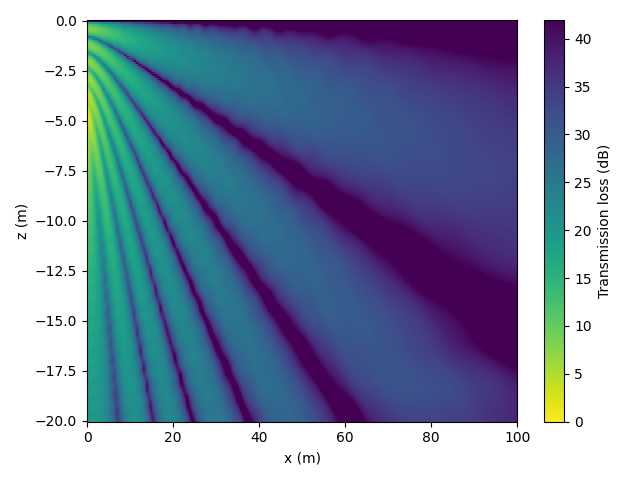
More propagation models
Using other acoustic propagation models such as Bellhop, Kraken, etc is a breeze. During installation, include the relevant Julia packages. For example, to use Bellhop or Kraken, include AcousticToolbox.jl:
import juliapkg
juliapkg.add("AcousticsToolbox", "268a15bc-5756-47d6-9bea-fa5dc21c97f8")
Note
To use models like Bellhop, Kraken, etc, you will NOT need to install the FORTRAN binaries separately. They are automatically installed when you install the relevant Julia packages.
To use the propagation models from AcousticToolbox.jl:
from juliacall import Main as jl
jl.seval("using UnderwaterAcoustics")
jl.seval("using AcousticsToolbox")

bathy = jl.SampledField(np.array([200, 150]), x=np.array([0, 1000]))
ssp = jl.SampledField(np.array([1500, 1480, 1495, 1510, 1520]), z=jl.range(0, -200, step=-50), interp=jl.CubicSpline())
env = jl.UnderwaterEnvironment(bathymetry=bathy, soundspeed=ssp, seabed=jl.SandyClay)
pm = jl.Bellhop(env)
tx = jl.AcousticSource(0.0, -5.0, 1000.0)
rx = jl.AcousticReceiver(100.0, -10.0)
rays = jl.arrivals(pm, tx, rx)
7 element Vector{RayArrival}:
∠ -9.0° 0⤒ 0⤓ ∠ -3.8° | 672.12 ms | -60.5 dB ϕ 0.0°↝
∠-13.2° 0⤒ 1⤓ ∠-14.3° | 677.43 ms | -88.6 dB ϕ 129.4°↝
∠ 10.3° 1⤒ 0⤓ ∠ 6.3° | 680.38 ms | -60.3 dB ϕ 180.0°↝
∠ 16.2° 1⤒ 1⤓ ∠-18.9° | 693.31 ms | -87.7 dB ϕ-156.5°↝
∠-20.9° 1⤒ 1⤓ ∠ 24.4° | 724.26 ms | -87.4 dB ϕ-168.6°↝
∠ 24.9° 2⤒ 1⤓ ∠ 29.0° | 749.86 ms | -85.4 dB ϕ 6.1°↝
∠ 35.5° 3⤒ 2⤓ ∠ 45.7° | 877.95 ms | -108.0 dB ϕ-175.2°↝jl.seval("using Plots")
jl.seval("plot_add = plot!")
p = jl.plot(env, xlims=(-10,110))
jl.plot_add(tx)
jl.plot_add(rx)
jl.plot_add(rays)
jl.display(p)
Channel modeling
We can also access the channel modeling API from Python. For example, we can obtain a channel from a propagation model:
env = jl.UnderwaterEnvironment(bathymetry=20, seabed=jl.SandyClay)
pm = jl.PekerisRayTracer(env)
tx = jl.AcousticSource(0.0, -5.0, 1000.0, spl=170)
rx = jl.AcousticReceiver(100.0, -10.0)
fs = 192000
ch = jl.channel(pm, tx, rx, fs, noise=jl.RedGaussianNoise(0.5e6))
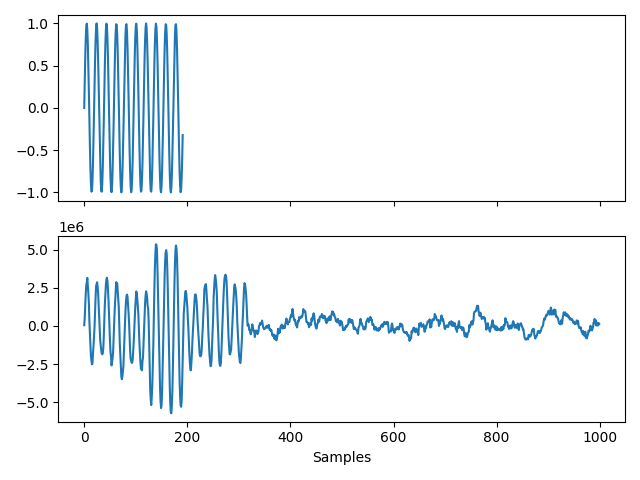
We can then create a signal and pass it through the channel:
import numpy as np

x = np.sin(2 * np.pi * 10000 * np.arange(0, 0.001, 1/fs))
y = jl.transmit(ch, x, fs=fs)  # returned signal is a Julia SampledSignal object
y = np.array(y)                # so we convert it to a numpy array
and plot it using matplotlib:
import matplotlib.pyplot as plt

fig, (ax1, ax2) = plt.subplots(2, 1, sharex=True)
ax1.plot(x)
ax2.plot(y[:1000])
ax2.set_xlabel("Samples")
plt.tight_layout()
plt.show()